 Español
 Bahasa Melayu
 Français
Lucky Star Deposit and Withdrawal Methods: Limits and Timing
Lucky Star deposit limits start at ₹300 for UPI, PhonePe and PayTM in the India payment table. UPI has the highest rupee deposit ceiling of these methods; withdrawals use IMPS or crypto. Compare each method's range and timing below, with separate figures for Malaysia.
- India's payment table lists instant deposits through UPI, PhonePe, PayTM and crypto, with IMPS or crypto for withdrawals.
- Malaysia has FPX and local wallets alongside crypto.
- The tables are dated 1 and 5 October 2026 respectively; each country's methods have their own limits and payout timing.
Lucky Star payments at a glance
Payment methods are country-specific; these account details and withdrawal rules put the dated tables in context.
| Payment detail | What applies |
|---|---|
| India registration currency | Indian rupee (INR) |
| India deposit methods | UPI, PhonePe, PayTM and crypto |
| India withdrawal methods | IMPS and crypto |
| General withdrawal processing | After KYC: up to 72 hours at ≤1,000 EUR or equivalent; up to 7 days above that |
| Withdrawal fee | None charged by Lucky Star |
| Deposit fee | Any charge comes from the payment system |
| Additional balances | Add currencies through Add + |
| Account currency selection | 70+ currencies, including crypto |
Cash-out processing follows verification, with the document requirements explained under withdrawals.
Cashier limits: India and Malaysia
India's table is dated ; Malaysia's is dated . Rupee limits apply to the India methods. Malaysia uses MYR, with each deposit method detailed in the next table.
| Transaction | Methods and limits | Timing |
|---|---|---|
| India deposit | UPI ₹300–₹100,000; PhonePe and PayTM ₹300–₹50,000 each; crypto by coin/rate | Instant |
| India withdrawal | IMPS ₹1,200–₹45,000; crypto | IMPS usually within 15 minutes, in some cases up to 72 hours; crypto instant |
| Malaysia deposit | FPX, local wallets and crypto; method ranges below | Instant |
| Malaysia withdrawal | Malaysian banks MYR 100–5,000; crypto | Up to 72 hours for banks and crypto |
Limits can change, so use the cashier's current figures when making a transaction. A deposit method does not automatically double as a payout method: withdrawal methods and limits explain the available routes.
Malaysia deposit ranges by method
FPX Malaysian banks has the lowest fiat starting amount in this table. Wallet limits differ, so a payment that fits one method's range may exceed another's ceiling.
| Deposit method | Range in MYR |
|---|---|
| FPX Malaysian banks | 20–5,000 |
| Touch N Go | 30–1,000 |
| DuitNow | 30–1,000 |
Show remaining methods
| Deposit method | Range in MYR |
|---|---|
| GrabPay | 30–3,000 |
| Boost | 40–1,000 |
| Crypto | Depends on the coin and exchange rate |
Malaysia's crypto payout timing is longer than the instant entry in the India table. Use the country-specific timing when planning a withdrawal.
Methods at a glance
UPI, PhonePe and PayTM make up the rupee deposit options in the India table. Malaysia has a separate set of bank and wallet methods; crypto appears in both country tables.
UPI
India's bank-app payment route uses a transaction reference to confirm the deposit.PhonePe and PayTM
Both are rupee deposit methods in the India table, with the same published range.FPX Malaysian banks
Malaysia's bank deposit option has a different range from the local wallets.Malaysia wallets
Touch N Go, DuitNow, GrabPay and Boost each have their own MYR deposit range.Crypto
Coin-based deposits and withdrawals use cryptocurrency amounts rather than the fiat ranges.
UPI belongs to the deposit side of the India table; cash-outs use the methods described under withdrawals.
How to top up
A UPI deposit includes a separate confirmation in Payment Details. After paying in your bank app, finish the deposit with the transaction reference.
Open Deposit after signing in and select a payment method. For a rupee deposit, choose from the India options; a new account starts with the currency selected during registration.
Enter an amount within the chosen method's range. UPI's ceiling is higher than PhonePe's and PayTM's, so the choice matters when the amount exceeds those wallet limits.
Open the banking app when prompted, enter the payment amount again and tap Proceed to Pay. The banking app then provides the reference needed to finish the deposit confirmation.
UTR and the I Paid button
Copy the 12-digit UTR after the bank payment. Tap I Paid, enter that number in Payment Details and press Confirm. Allow 1–3 minutes, then refresh the page to update the balance.
The reference connects the bank payment to its confirmation in Lucky Star; keep it available if you need payment support.
Sign in before opening Deposit
The cash desk opens Login when you have not signed in. Use the Phone or Email tab and your password; the Register option opens the form for a new account.
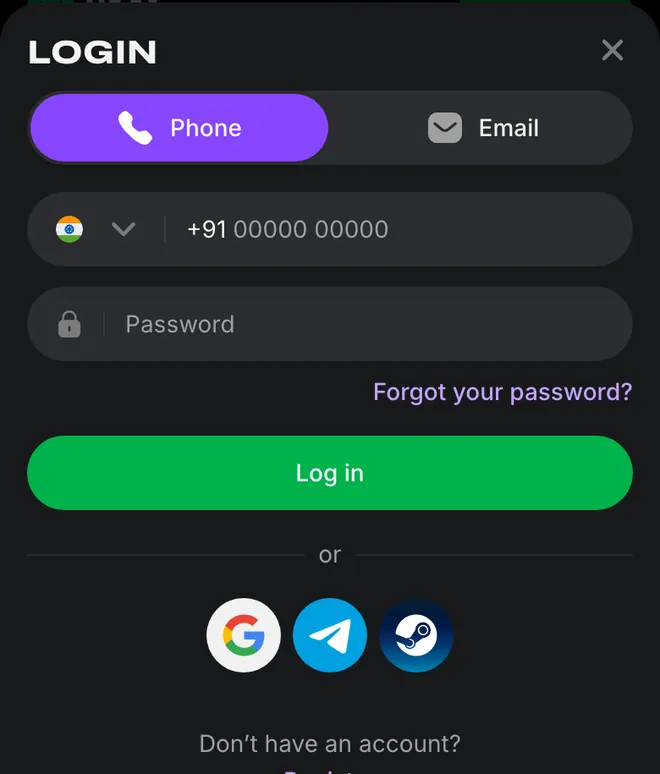
Forgot your password? starts recovery from this window; login and account recovery explain the available routes.
Choose the account currency before topping up
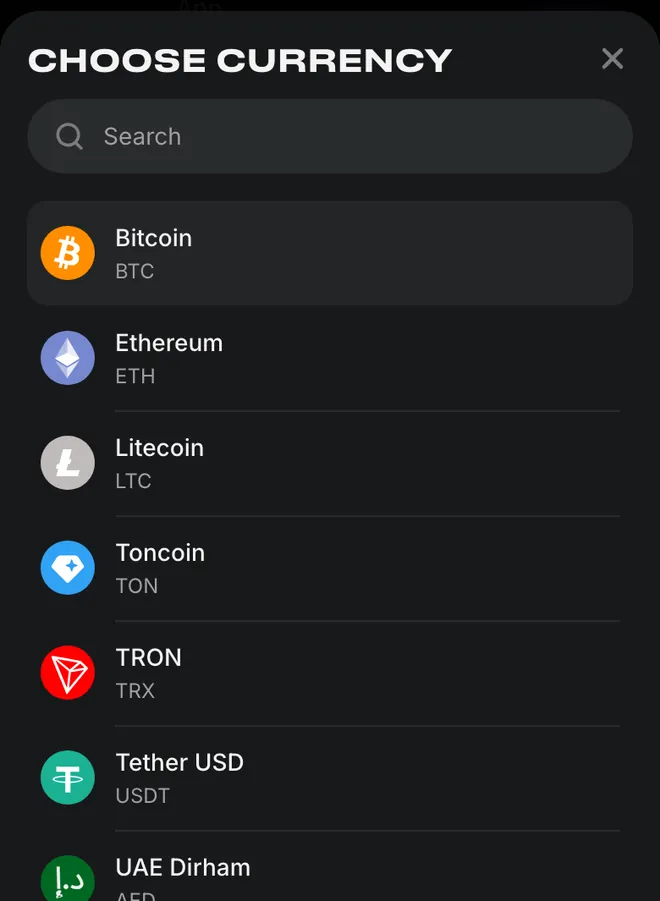
Indian rupee appears in the registration currency field. Tap that field to open Choose currency, where the search box sits above the available currency entries.
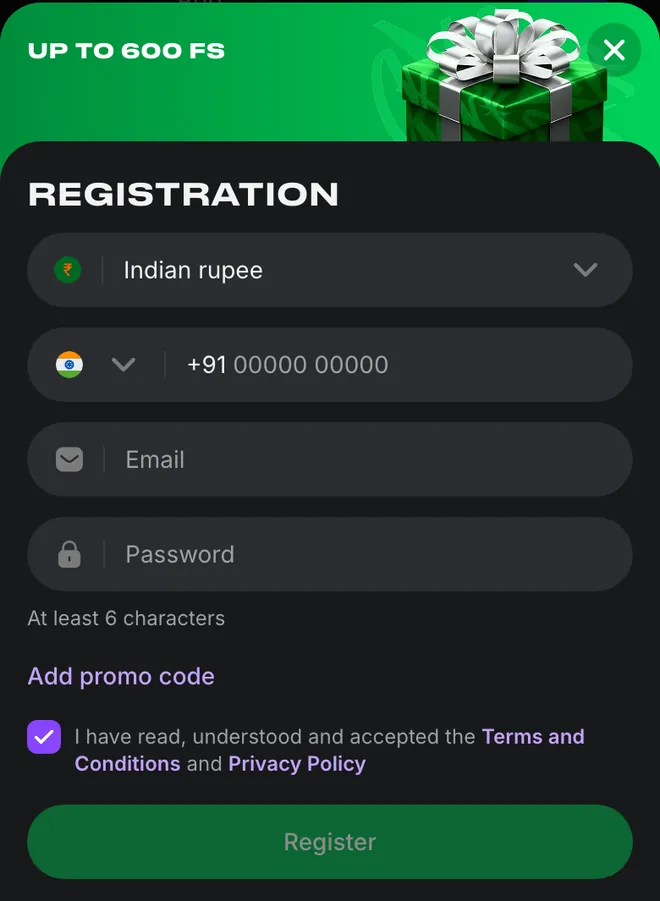
Registration form
- 1Tap the Indian rupee field to choose a currency.
- 2Complete the phone, email and password fields, then submit the form.
Currency menu
- 1Use Search to locate the currency.
- 2Select the currency for the registration form.
The currency selection belongs to account setup; registration details cover the remaining fields and consent checkbox.
Common reasons a payment stays pending
A balance that has not refreshed needs the confirmation sequence first. Keep the banking reference available while working through the UPI instructions.
Confirmation interval
Allow the waiting period after Confirm, then refresh the page rather than judging the balance before that step.Reference entry
Compare the UTR entered in Payment Details with the number supplied by the banking app.Still unresolved
Send the UTR to the 24/7 chat so support can address the payment question.
For a payment that remains unresolved, contact support through the chat or contact@lucky-star.best.
What you can and cannot do
Additional currency balances are available through Add +. They do not turn a crypto deposit into a fiat payout: the deposit type also determines the withdrawal type.
Allowed
- ✓Pay with a method in your own name.
- ✓Add currency balances through Add +.
- ✓Use crypto for deposits and withdrawals.
Not allowed
- ✕Withdraw fiat from a crypto deposit, or crypto from a fiat deposit.
- ✕Share an account with another person.
Watch out
- !Use the current cashier limits when entering an amount.
- !The profile name must match the payment method.
Payment choices that need attention
- 1
Assuming deposit means payout
The India deposit and withdrawal lists differ; use the payout list when choosing how to receive money. - 2
Using another country's timing
Crypto payout entries differ between the India and Malaysia tables; use the one for your country.
Visa payouts to cards issued in India or Malaysia are not supported. The withdrawal process covers bank and crypto alternatives, with general conditions in the withdrawal conditions.
Crypto
BTC, ETH, LTC, TON, TRX and USDT are listed for deposits and withdrawals. The registration currency menu displays their full names alongside the currency codes.
Bitcoin, Ethereum and Litecoin appear at the top of the currency list, followed by Toncoin, TRON and Tether USD. Choose the currency entry that corresponds to the balance you want to use.
Crypto amounts depend on the coin and exchange rate rather than a universal rupee minimum. The country tables separate deposit timing from payout timing, so an instant deposit entry does not set the withdrawal deadline.
For the cash-out sequence after a coin-based top-up, use crypto withdrawals.
After the deposit
The welcome offer is up to 600 free spins on your first 4 deposits: 130, 140, 160 and 170 spins in order.
Welcome bonus tiers
Match the welcome allocation to the deposit number and read the promotion details.Withdrawal preparation
Follow the payout process and prepare the verification documents before requesting money.Open the cashier
Continue to the account's Deposit option to choose a payment method.
Lucky Points exchange opens after the first deposit, from 1,200 points at the account currency's table rate; exchanged funds need x1 wagering before withdrawal, as explained in bonus and points details.
Deposit rewards and contact verification
40 free spins for verifying your phone number and email sit alongside the deposit-based welcome offer. The verification promotion has separate instructions for the phone and email tasks.
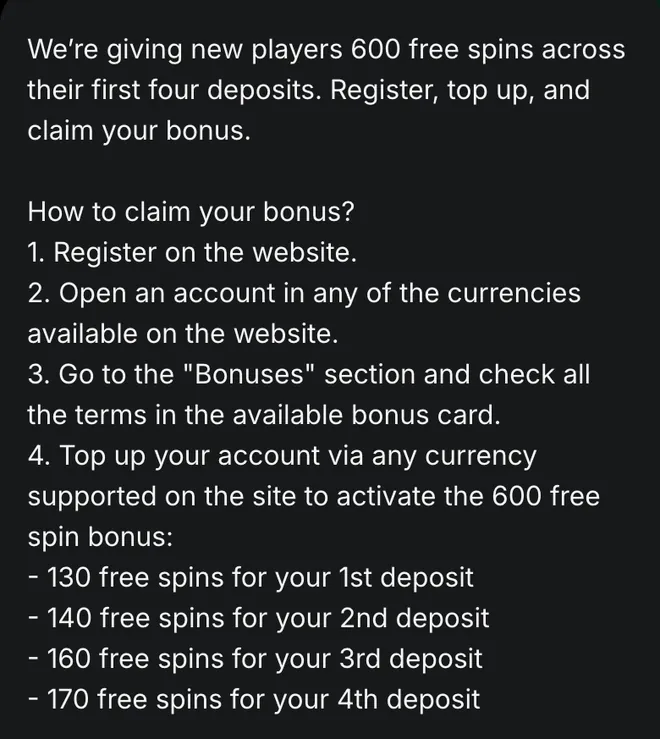
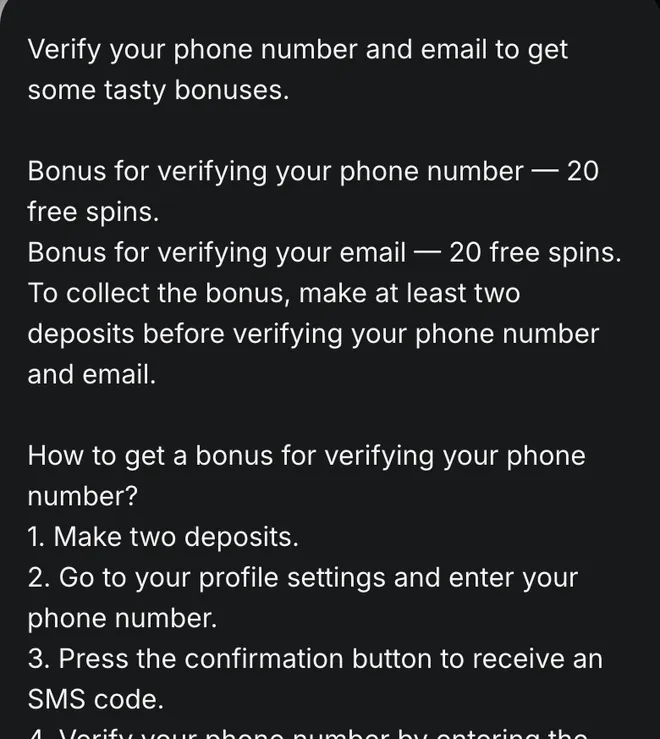
The welcome instructions direct you to the bonus card before topping up; promotion details distinguish that offer from the contact-verification reward.
Bonus terms before a deposit
For the welcome offer, the minimum deposit, wagering and limits are in the bonus card in the Bonuses section. Bonus availability and conditions depend on the country and account currency.
The payment-method ranges above describe transactions; welcome bonus details cover the promotion attached to a deposit.
Payment terms
- UPI
- Unified Payments Interface: the payment method used in the bank-app deposit instructions.
- UTR
- Unique Transaction Reference: the transaction number entered in Payment Details after a UPI payment.
- IMPS
- Immediate Payment Service: the bank-transfer withdrawal method in the India payment table.
- KYC
- Know Your Customer: identity, address and payment-method verification required for withdrawals.
- Fiat
- A national currency, such as INR or MYR, rather than a cryptocurrency.
Sources
Where the facts on this page come from
- Lucky Star rules: payments and How to Make a DepositPayment rules, UPI instructions and KYC
- Lucky Star promotions: welcome and verification offersPublic promotion descriptions, 12 November 2026
Lucky Star deposit questions
UPI, PhonePe, PayTM and crypto appear in the India table dated . Crypto options are BTC, ETH, LTC, TON, TRX and USDT. Method availability depends on the country and the cashier's current list.
Lucky Star charges no withdrawal fee. Any deposit fee comes from the payment system.
No. Visa payouts to cards issued in India are not supported. The India payment table lists IMPS and crypto for cash-outs; withdrawal methods and limits cover the next steps.
No. A crypto deposit must be withdrawn as crypto. Fiat deposits must be withdrawn as fiat; opening another currency balance does not remove this rule.
FPX Malaysian banks, Touch N Go, DuitNow, GrabPay, Boost and crypto appear in the Malaysia table dated . Withdrawals use Malaysian banks or crypto, with timing of up to 72 hours in that table.
₹300 for UPI, PhonePe and PayTM in the table dated . Crypto amounts depend on the coin and exchange rate. A payment-method minimum is separate from the conditions attached to a welcome bonus.
- First version of the page: deposit methods, country limits and UPI payment instructions.
About this site
This site is informational: it is not Lucky Star or its official page, and it takes no deposits or bets.
The operator's published rules do not name a licence, regulator or legal entity. Availability depends on the country, and offer terms depend on the country and the account currency.
18+ only. Gambling can be addictive – read the safer-gambling page.
 Welcome offer