 Español
 Bahasa Melayu
 Français
Lucky Star Casino Sign-Up: Four Steps to Your First Spin
Lucky Star registration starts with one account in your own name, matching your payment method. Tap Registration to choose a currency and enter your phone, email and password. You can play after signing up; withdrawals require verification. Already registered? Use login and password recovery to return to your account.
- Have your phone number and email ready, then choose a currency and set a password of at least 6 characters.
- The India form starts with Indian rupee and +91.
- Open Registration, fill in the fields, accept the terms and press Register.
- Playing is available after sign-up; verification comes before withdrawals.
Lucky Star login and registration at a glance
The form collects your contact details, while the account rules connect your profile to your payment method.
| Before you start | Requirement or option |
|---|---|
| Age | 18+, or the higher age required by your country of citizenship |
| Accounts | One per person |
| Form fields | Currency, phone, email and password |
| Password | At least 6 characters |
| Promo code | Optional Add promo code field |
| Verification | Required before withdrawals |
| Welcome pack | Up to 600 free spins on your first 4 deposits |
| Social sign-up | Google, Telegram or Steam |
| Extra currency accounts | Available through Add + |
An existing account stays your route back to play: use phone or email login rather than opening another.
Account rules that save you trouble later
One account covers your play. Your profile name must match the name on the payment method, so account details matter before your first withdrawal.
Allowed
- ✓Use your own account and payment method.
- ✓Add currency accounts through Add + within your profile.
Not allowed
- ✕Open another player account to claim another bonus.
- ✕Claim duplicate bonuses across a family, address, phone, computer or IP.
Watch out
- !A deposit activates each welcome bonus; each is available once.
- !Activating another bonus cancels the current one.
Four mistakes to avoid
- 1
A different name on the payment method
Use a payment method in the same name as your profile; ownership forms part of verification. - 2
Requesting a withdrawal during a bonus
A withdrawal request cancels an active bonus. - 3
Planning a fiat payout from crypto
Choose your account currency with your payment route in mind; the currency rules are set out below. - 4
Creating a second account for a bonus
Lucky Star blocks multiple player accounts. Return through Login if you have already registered.
The account rules cover payment ownership and bonus eligibility; document checks are part of the withdrawal process.
Four steps to a Lucky Star account
Registration opens from the header beside Login. The form places currency first, followed by your contact details and password.
- 1
Open Registration
Tap the green Registration button in the header to open the sign-up window. - 2
Choose currency and fill the fields
Keep Indian rupee or choose another currency. Enter your phone with the correct prefix, email and a password of at least 6 characters. - 3
Accept the terms and register
Use Add promo code if you have a code. Accept the Terms and Conditions and Privacy Policy, then press Register. - 4
Confirm your contact details
After two deposits, confirm your phone number and email in profile settings for the separate contact-verification promotion.
Go to the site to open the form. If you want to use a code, the promo code instructions explain its place in registration.
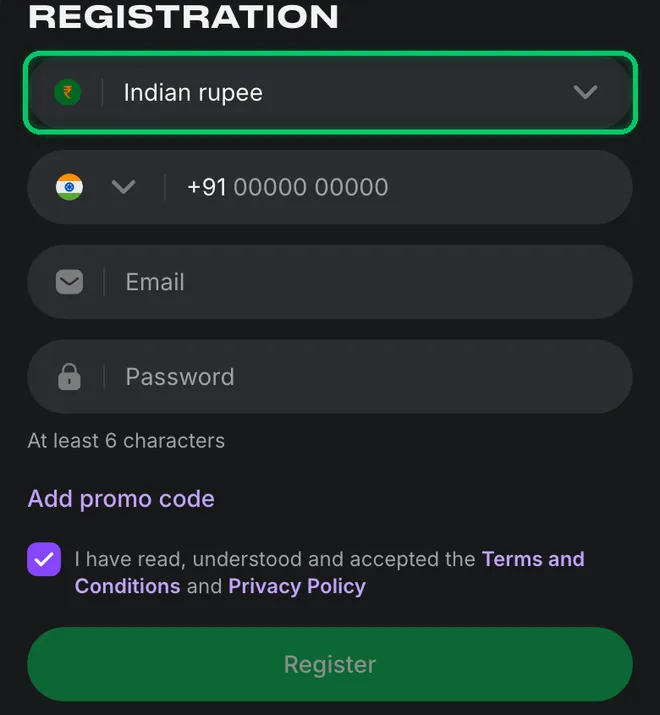
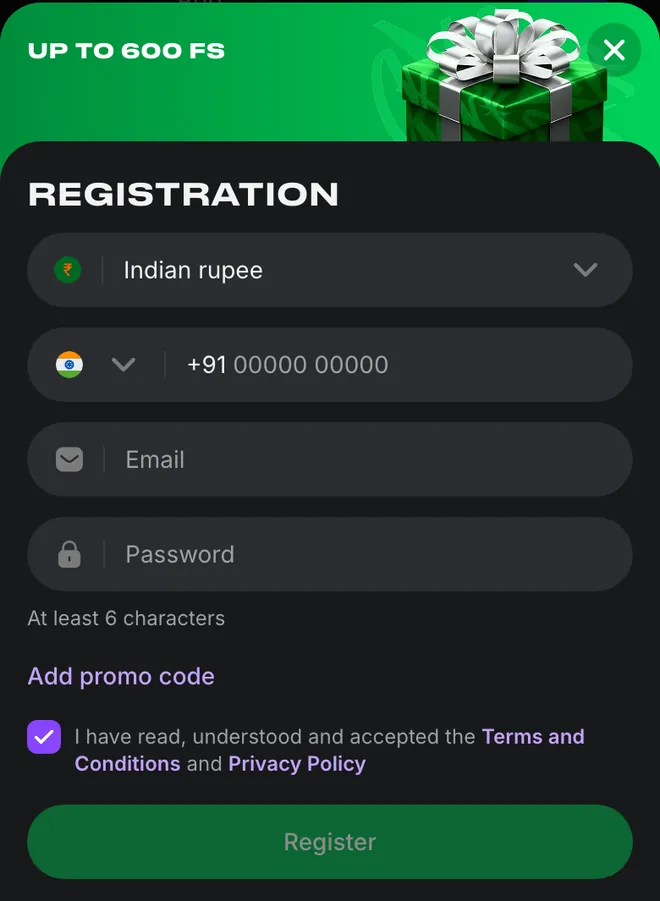
Registration button, currency and final form
The green outline marks Registration in the header and Indian rupee inside the form. Add promo code sits below Password, with the consent checkbox above Register.
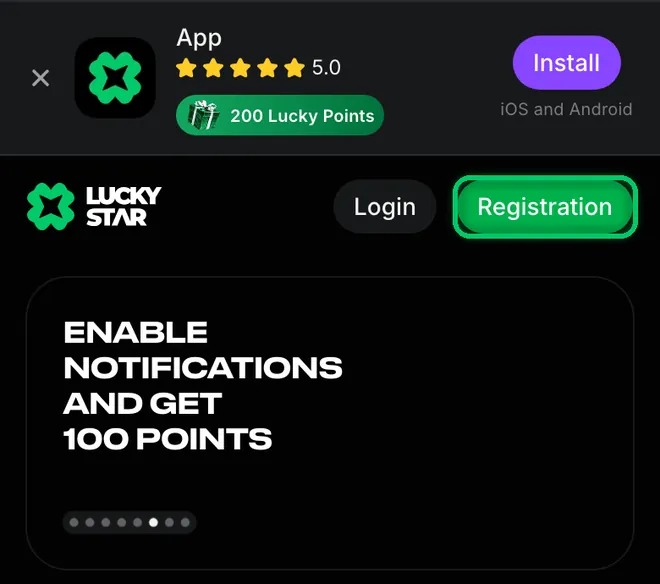
1. Tap Registration inside the green outline.
2. Tap Indian rupee inside the green outline to choose a currency.
3. Enter your details and accept the terms before pressing Register.
The app options cover Android and iOS access from the mobile header.
Choose your currency before submitting the form
Indian rupee is the default in the India form. Choose currency includes a search field and entries for Bitcoin, Ethereum, Litecoin, Toncoin, TRON and Tether USD.
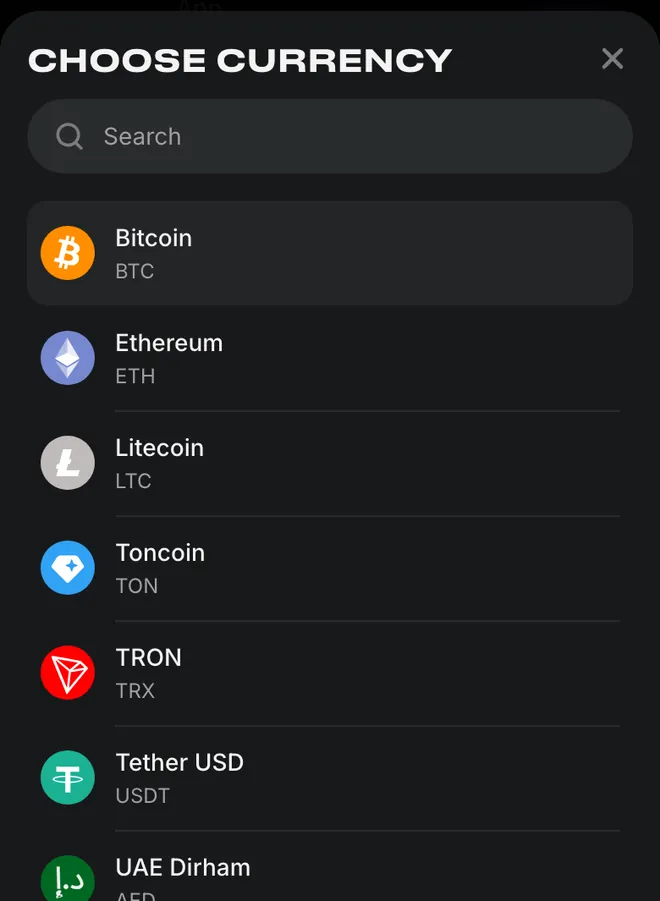
Choosing a currency before you register
INR keeps your account in rupees. Add + lets you add further currency accounts within the same profile, so a new currency does not require another player account. The payment methods explain the options for funding your balance.
What you get after registering
The welcome pack offers up to 600 free spins on your first 4 deposits. Deposits activate the pack in stages.
| Deposit | Free spins |
|---|---|
| First | 130 |
| Second | 140 |
| Third | 160 |
| Fourth | 170 |
Winnings from these spins go to the bonus balance for play in Bonus wagering before transfer to your main account. The welcome pack details cover the bonus process.
The welcome promotion starts with a top-up
The promotion directs new players to register, open a currency account and read the available bonus card before topping up.
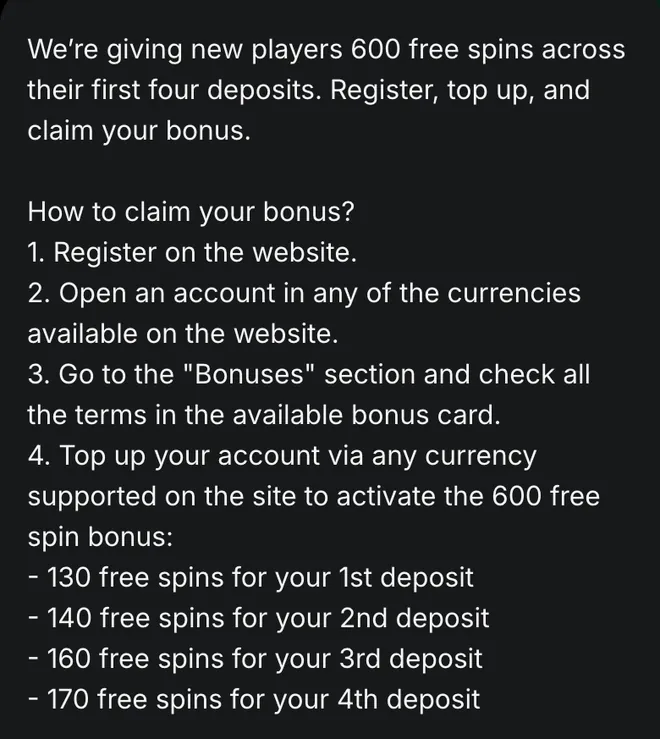
The bonus balance and wagering process cover the next stage after topping up.
Contact confirmation and Lucky Points tasks
Phone and email confirmation has a separate free-spin promotion. App installation and selected tasks award Lucky Points, which follow their own exchange rules.
Phone and email
40 free spins for verifying your phone number and email after two deposits.App installation
200 Lucky Points for installing the app on iOS or Android.Telegram task
100 Lucky Points for subscribing to Telegram.Android notifications
100 Lucky Points for the first push-notification subscription on Android.
A weekly deposit from USD 5 also opens Wheel of Fortune for a daily spin over 7 days. The available promotions cover the wheel, while mobile installation explains the app route.
Verification documents and what they prove
Withdrawals require KYC verification. Lucky Star checks your identity and address alongside ownership of the payment method used for your account.
| Document | Purpose | Requirement |
|---|---|---|
| Identity document | Establishes your age and name | Details must identify the account holder |
| Utility bill | Confirms your address | No older than 3 months |
Show payment-method evidence
| Document | Purpose | Requirement |
|---|---|---|
| Payment-method evidence | Confirms ownership | Name must match your profile |
Verifying a phone and email does not replace these document checks. The withdrawal process explains what follows account verification.
Help with registration or account access
Contact options
- Live chat
- 24/7
- contact@lucky-star.best
Account details
- ✓Password login; no two-factor protection
- ✓Confirmed-data changes through support
Start with password recovery for a forgotten password; the support options cover further access problems.
Bonus and payment conditions to keep in view
Bonus availability and conditions depend on your country and account currency. The minimum deposit, wagering and limits are in the bonus card in the Bonuses section.
Points exchange
Exchange starts at 1,200 Lucky Points after your first deposit. The rate follows your account currency; withdrawing exchanged money requires x1 wagering.Keep payment types aligned
A crypto deposit cannot be withdrawn in fiat, and a fiat deposit cannot be withdrawn in crypto.Deposit turnover
Before withdrawing, place bets totalling 100% of your deposits.Bonus deadlines
The bonus card sets activation and wagering deadlines. Missing the deadline cancels the bonus.
The deposit limits and account breaks cover account controls. Return to the casino and sportsbook overview to choose a section after registration.
Account and bonus terms explained
- KYC
- Know Your Customer: identity, address and payment-method checks required before withdrawals.
- FS
- Free spins: promotional slot spins, with winnings subject to the relevant bonus conditions.
- Bonus wagering
- The casino category for playing through winnings held on the bonus balance.
- Lucky Points
- Loyalty points earned through eligible play and selected tasks, exchangeable under the points programme rules.
Sources
Where the facts on this page come from
- Lucky Star account and KYC rulesRegistration, identity and payment requirements
- Lucky Star promotionsWelcome pack and phone and email promotion
Lucky Star registration questions
Open Registration in the header, choose a currency and fill in your phone number, email and password. Accept the Terms and Conditions and Privacy Policy, then press Register. Existing account holders can use login instead.
A phone number, an email address and a password of at least 6 characters. The India form displays Indian rupee and the +91 phone prefix. Documents come later, for verification before withdrawals.
Yes, Google, Telegram and Steam are available alongside the registration form. For returning users, account access also includes phone or email with a password.
The welcome pack offers up to 600 free spins on your first 4 deposits, activated by deposits. A separate promotion offers 40 free spins for verifying your phone number and email after at least two deposits. The bonus details explain the available promotions.
Use Add promo code beneath the password field. It is optional. The promo code section explains the difference between entering a code during sign-up and activating one in your account.
No, you can start playing after registration. Withdrawals require identity, address and payment-method verification. The withdrawal requirements explain the next stage.
- First version of the page. Registration steps, account rules and documents for withdrawals.
About this site
This site is informational: it is not Lucky Star or its official page, and it takes no deposits or bets.
The operator's published rules do not name a licence, regulator or legal entity. Availability depends on the country, and offer terms depend on the country and the account currency.
18+ only. Gambling can be addictive – read the safer-gambling page.
 Welcome offer